The Model Context Protocol (MCP) is Anthropic's open standard for giving language models structured, type-safe access to external systems. Think of it as USB-C for AI tools one consistent interface regardless of which agent, host, or service is on either end. When I started this project I wanted to answer a simple question: what does it actually take to wrap a messy real-world protocol like IMAP/SMTP into something an LLM can call cleanly?
Why Gmail?
Email is one of those surfaces that every knowledge-worker drowns in. If an AI agent can reliably search threads, extract context, and compose replies without ever opening a browser or scraping HTML it unlocks a whole category of automations that are currently friction-heavy. Gmail's REST API is the obvious answer but it requires an OAuth 2 consent flow that breaks down in headless agent environments. App Passwords over raw IMAP/SMTP let us bypass that entirely.
The Architecture
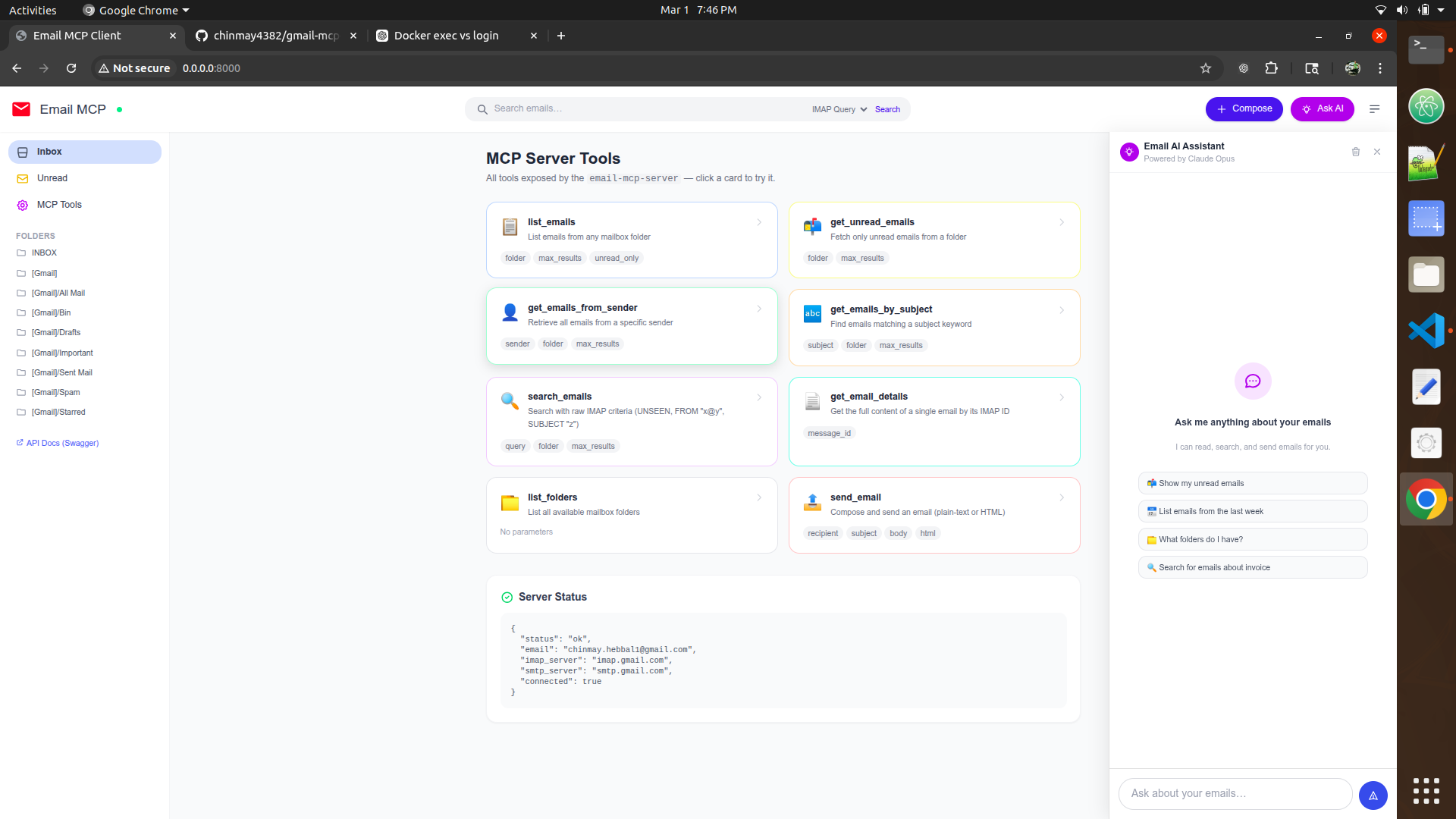 Gmail MCP Server architecture overview from the repo
The server ships with two modes behind the same codebase. A FastAPI web UI on port 8000 for humans who want direct inbox management, and a headless MCP server that speaks the protocol's JSON-RPC transport over stdio. Both share the same IMAP/SMTP connection layer.
gmail-mcp-server/
├── server.py         # MCP tool definitions + stdio transport
├── app.py            # FastAPI web UI (port 8000)
├── gmail_client.py   # IMAP/SMTP abstraction layer
├── Dockerfile
├── docker-compose.yml
└── .env.example      # GMAIL_ADDRESS + GMAIL_APP_PASSWORD
The 8 MCP Tools
Every tool is declared with a JSON Schema so the agent knows exactly what arguments to supply and what shape the response takes. Here's the full surface area:
| Tool name | What it does |
|---|---|
| list_emails | Returns the N most recent messages (subject, sender, date, snippet) |
| search_emails | Full-text search across subject and body |
| search_by_sender | Filters messages from a specific address |
| search_by_subject | Filters by subject line keyword |
| get_unread | Returns all unread messages |
| get_email_details | Fetches the full body + headers of one message by UID |
| send_email | Composes and sends via SMTP |
| list_folders | Enumerates all IMAP mailboxes/labels |
Defining a Tool in Code
The MCP Python SDK makes this refreshingly clean. You decorate a function with
@mcp.tool()
and return a Pydantic model. The SDK handles schema generation, JSON-RPC dispatch,
and error serialisation automatically.
from mcp.server.fastmcp import FastMCP
from gmail_client import GmailClient

mcp = FastMCP("gmail")
client = GmailClient()

@mcp.tool()
async def search_emails(query: str, limit: int = 10) -> list[dict]:
    """Search emails by keyword across subject and body."""
    return await client.search(query, limit)
The IMAP Connection Layer
IMAP is stateful and connection-hungry, which is exactly the wrong shape for an async
server handling concurrent agent requests. The fix is a small connection pool wrapped in
an asynccontextmanager
each operation borrows a connection, runs its fetch, and returns it immediately.
import imaplib, asyncio
from contextlib import asynccontextmanager

class GmailClient:
    def __init__(self):
        self._pool: list[imaplib.IMAP4_SSL] = []

    @asynccontextmanager
    async def _conn(self):
        conn = await asyncio.to_thread(self._acquire)
        try:
            yield conn
        finally:
            self._pool.append(conn)

    async def search(self, query: str, limit: int) -> list:
        async with self._conn() as conn:
            return await asyncio.to_thread(self._do_search, conn, query, limit)
Auth: App Passwords Beat OAuth Here
Google's App Passwords are 16-character tokens scoped to a single app. They live in
.env
as GMAIL_APP_PASSWORD
and require 2-Step Verification to be enabled on the Google account.
No redirect URIs, no token refresh, no consent screen the agent just works.
Docker Setup
Both modes are selectable via a single environment variable so the same image works in both contexts:
services:
  gmail-web:
    build: .
    environment:
      - MODE=web
      - GMAIL_ADDRESS=${GMAIL_ADDRESS}
      - GMAIL_APP_PASSWORD=${GMAIL_APP_PASSWORD}
    ports: ["8000:8000"]

  gmail-mcp:
    build: .
    environment:
      - MODE=mcp
      - GMAIL_ADDRESS=${GMAIL_ADDRESS}
      - GMAIL_APP_PASSWORD=${GMAIL_APP_PASSWORD}
Connecting to Claude
In Claude Desktop's config, point the MCP server entry at the Docker container's stdio transport. Claude will auto-discover all 8 tools, their schemas, and their descriptions and start using them within seconds of the first prompt.
{
  "mcpServers": {
    "gmail": {
      "command": "docker",
      "args": ["run", "--rm", "-i",
               "--env-file", ".env",
               "gmail-mcp-server"]
    }
  }
}
What I'd Do Differently
- Add a persistent SQLite cache for IMAP UIDs to avoid re-fetching full headers on every search
- Implement
IDLEpush notifications so the agent can react to new mail without polling - Expose a
reply_to_threadtool the currentsend_emailcreates a new thread - Rate-limit the SMTP path to avoid triggering Gmail's daily send quotas